NestJS redirect URI mismatch 문제 {OAUTH2}
- project
- false
- area
- false
- resource
- true
- status
- No value
- aliases
- No value
- tags
- passport oauth nestjs troubleshooting
- description
- No value
- title
- NestJS redirect URI mismatch 문제 {OAUTH2}
- created
- 2023-11-14T21:21:34
- updated
- 2026-07-29T13:03:36
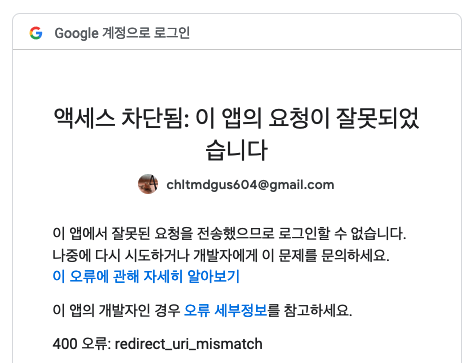
두 가지 엔드포인트가 있다.
/auth/google- 유저가 third party login을 시작할 때 요청하는 엔드포인트.
UseGuards(AuthGuard('google'))에서 걸려 구글 로그인 페이지로 리디렉션이 된다.
- 유저가 third party login을 시작할 때 요청하는 엔드포인트.
/auth/google/redirect- 구글 로그인을 마쳤을 때 구글측에서 자동으로 리디렉션 응답을 보내 호출될 엔드포인트
sequenceDiagram
    actor User
    participant Client
    participant NestJS
    participant Google

    User ->> Client: Google 계정으로 로그인
    Client ->> NestJS: GET /auth/google

    NestJS -->> Client: Google 로그인 URL로 리다이렉트
redirect_uri 포함
    Client ->> Google: GET /o/oauth2/v2/auth
client_id + redirect_uri

    Google ->> User: Google 로그인 및 동의 요청
    User ->> Google: 계정 인증 및 권한 동의

    Google -->> Client: redirect_uri로 리다이렉트
Authorization Code 포함
    Client ->> NestJS: GET /auth/google/redirect
?code={authorization_code}

    NestJS ->> Google: Authorization Code로
Access Token 및 Refresh Token 요청
    Google -->> NestJS: Access Token
Optional Refresh Token

    NestJS ->> Google: Access Token으로 사용자 정보 요청
    Google -->> NestJS: User data

    NestJS ->> NestJS: 사용자 DB 조회 및 추가
    NestJS -->> Client: Authentication success
    Client -->> User: 로그인 완료
구현 플로우
PassportStrategy를 상속한 google/kakao/naver strategy의 역할은 컨트롤러에게 컨텍스트가 넘어가기 전에 유저 데이터를 넘긴다. (여러가지 더 있긴 함) implementing passport strategiesauth.service.ts파일은 유저 데이터가 담긴 req의 email를 기반으로 DB에 쿼리를 날린다. 만약 유저가 존재한다면 그대로 리턴하고, 없다면 회원가입을 시켜 리턴한다.auth.controller.ts는 각 strategy 별로 두개씩 엔드포인트를 정의한다. 예를 들어 구글 strategy라면,/auth/google,/auth/google/redirect인 식이다. 이렇게 만드는 이유는 OAUTH2.0 기반 인증방식의 특징과 연관이 있다. 아래 이미지를 본다면 처음에 유저가 본 서버에 요청할 때에는 전자를, 구글 로그인을 마친 뒤에 다시 본 서버에 authorization code를 추가한 채로 요청할 때에는 후자를 사용한다.
TroubleShooting
엔드포인트 정의부 마지막에는 꼭 /를 붙여주세요.
before
@Controller('auth')
after
@Controller('auth/')